Save runs, comparisons and models to My shortlist
Keep interesting builds and models close at hand, return to them later, and open your saved models side by side. No account needed.
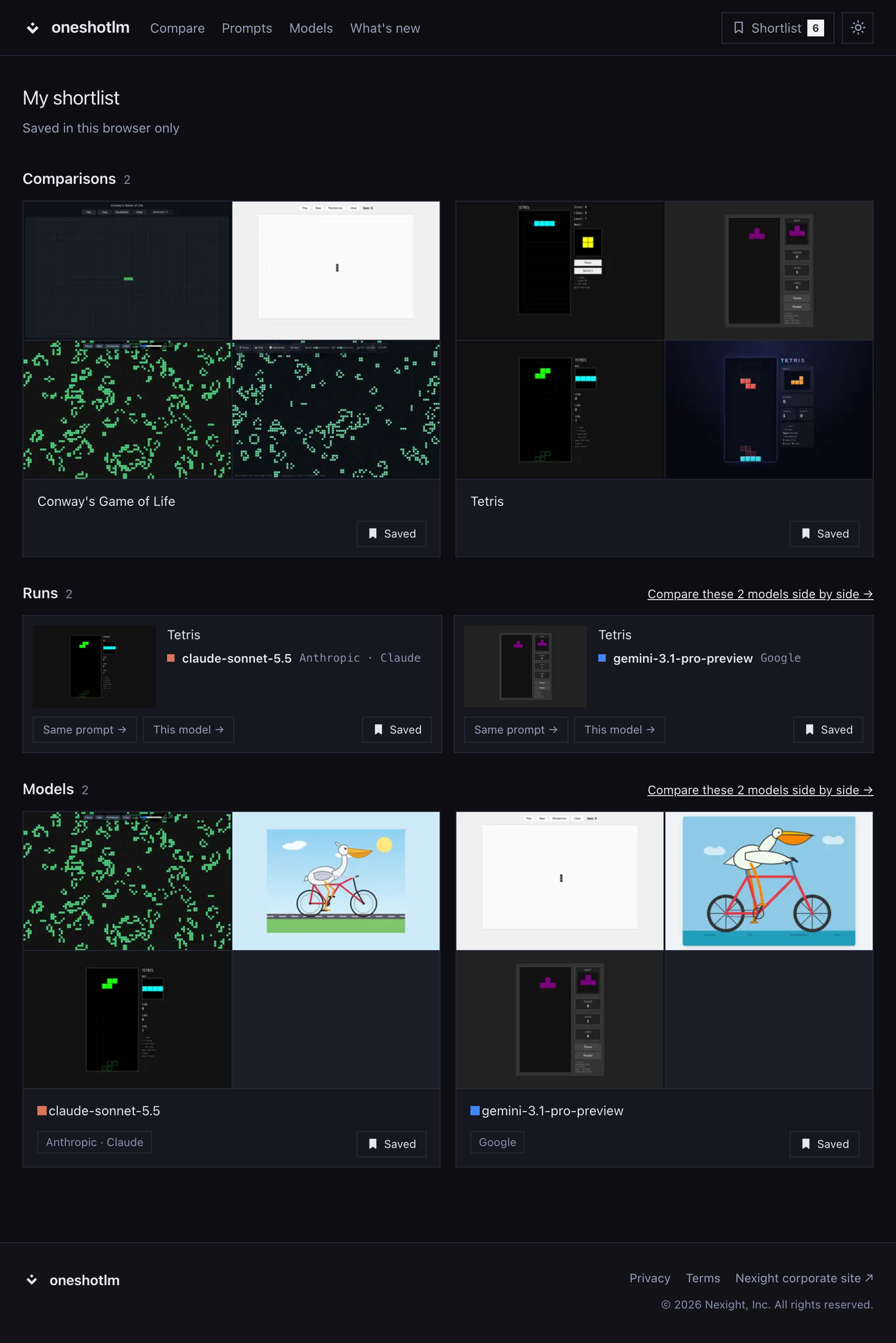
Found a build you want to revisit, a prompt worth comparing, or a model to explore further? My shortlist gives you one place to keep them.
Use Save beside the title on a run, prompt comparison or model page. You can also save individual runs directly from the run cards on comparison and model pages. The button changes to Saved; click it again to remove the item.
Open Shortlist in the site header to see your saved items in three sections:
- Comparisons brings you back to every model's builds for a saved prompt.
- Runs keeps individual builds, with links to the same prompt across models and to that model's other builds.
- Models keeps the models you want to explore across prompts.
Each section shows your most recent saves first. You can remove items right from the shortlist, and the header badge keeps track of how many you have saved.
When your saved runs include two or more different models, the Runs section offers a link to compare those models in the model matrix. The Models section offers the same link when you save two or more models. Both open a comparison across prompts with up to 10 models; if you have more, the link uses the 10 saved most recently.
Your shortlist stays in this browser on this device, with no account required. It is not synced to other browsers or devices, and clearing the site's browser data removes it.
Start with a prompt or a model, save what catches your eye, and return to your shortlist whenever you want to take another look.